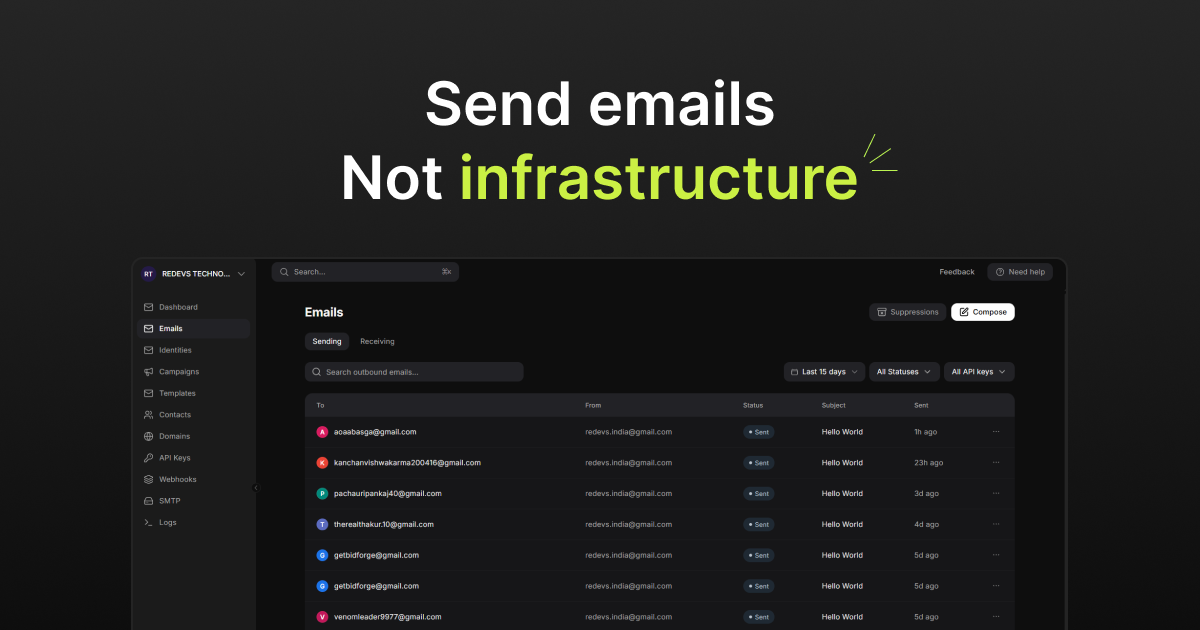
A product email is part of a user journey. Someone requests access, completes an order, or needs help getting back into an account. Sending a message is only one step: the team also needs to understand what happened afterward. That is the product idea behind Mailofly, our email infrastructure platform. Here is the reasoning behind bringing sending and day-to-day email operations into one place, and what other software teams can learn from that decision.
The problem is bigger than making an API call
Imagine an invitation flow. Your application creates an invitation and sends an email. The user says nothing arrived. Support now needs to connect the invitation, recipient address, email record, and eventual delivery outcome. A successful API response alone cannot answer all of those questions. This example illustrates the distinction between sending an email and supporting the complete customer experience.
Our design priority for Mailofly is to make that wider workflow understandable. Developers need a straightforward integration, while the people supporting the product need a way to investigate message activity. These are connected parts of one problem, rather than unrelated features to assemble later.
Keep the integration flexible and the operational context close
Mailofly’s public product includes REST API and SMTP sending, templates, searchable email logs, and signed delivery-event webhooks. These capabilities let teams connect application activity with message operations. The live website and documentation are the source for current functionality and limits. Explore Mailofly
The important product choice is where to reduce coordination. A developer should be able to integrate sending without forcing every future copy change into an application release. A support investigation should begin with the relevant message, rather than a search across several disconnected tools. Bringing those jobs closer together makes the platform’s purpose clearer.
Treat templates as part of the interface
A welcome email and an error screen both tell a person what happened and what to do next. We think they deserve the same attention to hierarchy, readable language, and reliable actions. The email should carry enough context to be useful without exposing unnecessary account information.
For an invitation message, that means identifying the workspace, explaining the invitation, and making the next step obvious. It also means deciding what happens if the invitation expires. A template is only successful when it fits the application behavior around it; a polished layout cannot repair a broken destination.
- Write the subject around the event the recipient recognizes.
- Use one clear primary action and explain what it opens.
- Check missing personalization values, small screens, and expired links.
Give teams visibility without promising every inbox outcome
Mailofly also documents domain verification checks, suppression controls, and event-triggered workflows. These are operational building blocks; they do not make inbox placement automatic. Recipient behavior, sender practices, and receiving systems still matter. Check the current Mailofly feature set
The interface should help a team tell the difference between a message accepted for processing, a recorded delivery event, and a customer actually completing a task. That distinction helps avoid misleading support answers. When an outcome is uncertain, the product should expose what is known and make the next investigation step easier.
What this means for a custom software project
Mailofly reflects a broader approach to custom software development: begin with a complete workflow, identify the people who rely on it, and design the operational follow-through alongside the visible interface. For another product, the equivalent might be payment reconciliation, appointment changes, or a failed data import. Our custom software development service
When evaluating a feature, ask three questions: how does a person start it, how does the team know it worked, and how can someone recover when it does not? Those questions make a more useful product brief than a list of screens alone. Our Mailofly project page explains where the product sits within TeamRedevs’ work. Read the Mailofly project overview
Where to explore Mailofly next
Visit Mailofly to see the current product, then use its developer documentation to evaluate the sending interface, events, and configuration against your own workflow. Start with one representative journey, such as a welcome or invitation flow, and include a failed-message investigation in the evaluation. Visit mailofly.com
If your question is about building a product rather than choosing an email provider, TeamRedevs can help turn the workflow into a scoped development brief. The useful starting point is the customer task and the outcome your team needs to support—not a predetermined feature count. Discuss a product with TeamRedevs
Apply this to your product
Start with one user journey or integration in your current product. Document the expected behavior, review the linked source material, and agree on the checks needed before release. The right implementation depends on your existing architecture and operational requirements.
Further reading
MORE FROM OUR TEAM
Related Engineering Insights
Cloud-Native Application Modernisation in India: A Practical Guide for Growing Businesses
Plan cloud-native modernisation with a practical guide to modular architecture, APIs, observability, security and phased migration for Indian businesses.
Custom Logistics Software for Nagpur Businesses: Fleet, Warehouse and Supply Chain Management
Explore custom logistics software for Nagpur businesses, from fleet and warehouse workflows to shipment tracking, integrations and operational dashboards.
Hotel Website Development in Jaipur: Direct Booking Platforms, Guest Experience and Digital Growth
Learn how Jaipur hotels and hospitality businesses can improve direct bookings with fast websites, booking journeys, CRM integrations and mobile-first UX.